It’s Monday morning. You’re on a video call with a client; the heating adjusts automatically, and your security cameras watch over the entrance. Elsewhere in the house, a smart television downloads an update while visiting family connect their phones to the Wi-Fi.
All these devices share your internet connection. But should they all have the same access to your network?
When your home is also your workplace, that question deserves attention. Your business laptop may hold client documents, financial information and access to company systems. Your television, lighting controls and visitors’ devices have very different jobs.
Network segmentation and firewalls help organise those connections, giving devices the access they need while limiting unnecessary access to everything else.
What is network segmentation?
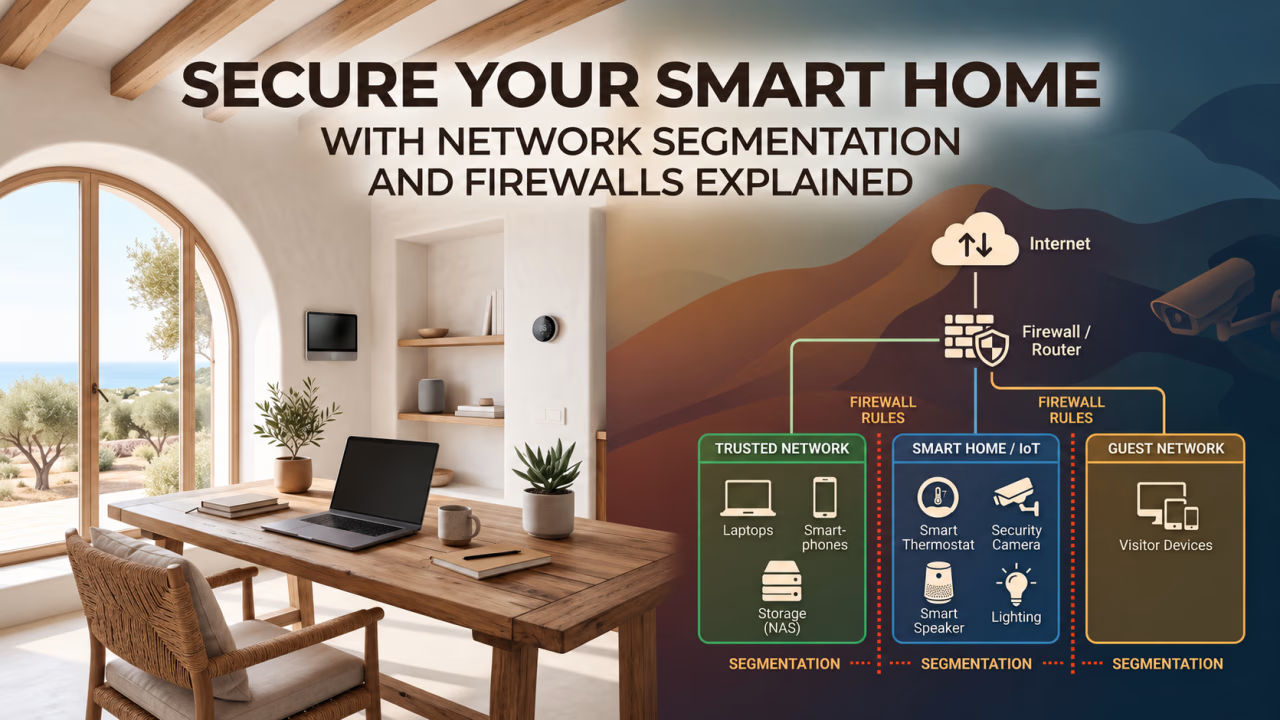
Network segmentation means dividing your network into separate areas for different devices or purposes.
Think of your home. Visitors can use the guest bedroom without needing a key to your office filing cabinet. A similar principle applies to connected devices: access should match the task.
In a typical home, many devices connect to one shared local network. Depending on their own protections and the network settings, they may be able to discover or communicate with one another. Segmentation introduces boundaries.
One common method uses VLANs, or Virtual Local Area Networks. These create logically separate networks over shared, compatible equipment. You don’t necessarily need a separate router and set of cables for every group of devices.
VLANs create the separate areas. Rules governing traffic between those areas determine how effectively they are isolated.
What does a firewall do?
A firewall allows or blocks network traffic according to rules.
At the connection to the internet, it can help restrict unwanted incoming connections. Within a segmented home network, it can also control communication between different groups of devices.
For example, the rules might allow:
- Your work computer to reach the internet and approved business resources.
- Your phone to access the home automation controller.
- Security cameras to send footage to the recording system.
- Visitors to use the internet.
They might also prevent smart appliances and guest devices from initiating connections to your work equipment.
Segmentation creates separate areas; firewall rules control the connections between them.
These rules should account for legitimate replies, too. If an authorised device requests information from another network, the response may need to return. Designing those permissions is more precise than simply blocking everything in one direction.
Doesn’t my router already have a firewall?
Many routers include a firewall. However, protecting the connection between your home and the internet is only part of the picture.
Traffic between devices on the same local network often does not pass through the router’s firewall at all. And even where separate networks exist, the router may allow communication between them unless suitable restrictions are configured.
The useful question is therefore: “What traffic does my firewall actually control?”
A firewall feature in a product description does not tell you whether your work laptop is separated from your smart television.
An example: a smart home with a home office
Imagine a consultant working from a villa on the Costa Blanca. Their home includes a business laptop, family devices, connected lighting and heating, security cameras and occasional guests.
A possible design could look like this:
Network area | Typical devices | Intended access |
|---|---|---|
Work | Business laptop and dedicated office equipment | Internet and required business resources. |
Personal | Family phones, tablets and computers | Everyday services and approved home controls. |
Smart home | Lighting, heating and automation devices | Required controllers and services. |
Cameras | Cameras and recording equipment | Recording and authorised viewing. |
Guests | Visitors’ phones and laptops | Internet, with any shared services deliberately authorised. |
This is an example, rather than a requirement for every property. Some homes need fewer divisions; others benefit from additional separation.
The important part is deciding what each device needs to reach. A work laptop might need access to a particular printer. A family phone might need to view cameras through the recording system. Neither requirement means opening unrestricted communication between entire networks.
For employer-managed equipment, the design should also respect the employer’s IT policies.
Why separation matters
If a connected device is compromised, a well-configured network can limit which other devices and services it can reach.
That does not mean every smart appliance is dangerous, or that a compromised device automatically gives someone access to your files. Computers have their own security protections. Segmentation adds another boundary and reduces unnecessary opportunities to move through the network.
Guest access follows the same logic. Friends and family generally need an internet connection. They rarely need access to business equipment, network administration or camera systems.
Good network design makes those distinctions deliberately.
Will my lights, cameras and television still work?
They can, provided the design accounts for their communication requirements.
Some devices connect directly to a local controller. Others depend on online services. Features such as casting, wireless printing and automatic device discovery may require additional configuration across network boundaries.
Being able to discover a device and being allowed to use it are also different things. A television appearing on your phone does not necessarily mean the network permits the connections needed to play a video.
This is why testing matters. Lighting controls, heating, camera viewing, printing and other everyday functions should be checked after changes.
A local automation platform such as Home Assistant can form part of the design, with access to the devices it controls. The required permissions depend on the integrations in use.
For the household, the result should feel straightforward: familiar controls work, automations run, and approved devices remain accessible.
Is a guest network enough?
A properly isolated guest network can be a useful starting point. However, its capabilities depend on the router and configuration.
Some guest networks restrict access to local devices so thoroughly that smart-home control or discovery stops working. Others allow selected shared services.
A second Wi-Fi name alone does not prove that devices are separated. Different names can lead to the same underlying network.
Segmentation also applies to wired equipment. A camera connected by Ethernet still needs appropriate access controls.
The right approach is to check what the equipment supports, configure the intended restrictions and test both permitted and blocked connections.
Keep the other layers of security
Segmentation complements everyday security measures:
- Keep routers, computers and smart-device software updated.
- Use strong, unique passwords and multifactor authentication where available.
- Disable remote-access features you do not need.
- Review devices that no longer receive security updates.
- Maintain suitable protection and backups for work equipment.
Local control can reduce dependence on external services, but local devices still require maintenance and access controls.
Security is an ongoing part of looking after the system, particularly as devices are added or replaced.
Where should you start?
You don’t need to know your VLAN numbers to ask useful questions:
- Which devices are connected to my network?
- Can visitors reach my personal or work equipment?
- What can my smart devices access?
- Which connections are necessary for printing, automation and camera viewing?
- Who checks the configuration when something changes?
The answers provide a starting point for a network assessment.
A network designed around your home and work
At InteliDomus, we design and install wired and wireless networks alongside smart-home and security systems across the Costa Blanca.
We consider how you work, how your household uses technology and which devices need to communicate. From there, we can plan appropriate network separation, firewall rules and the connections that keep daily life convenient.
Working from home with a growing collection of connected devices? Contact InteliDomus to discuss a network assessment and a design suited to your property.